> ## Documentation Index
> Fetch the complete documentation index at: https://docs.turso.tech/llms.txt
> Use this file to discover all available pages before exploring further.
# Embedded Replicas
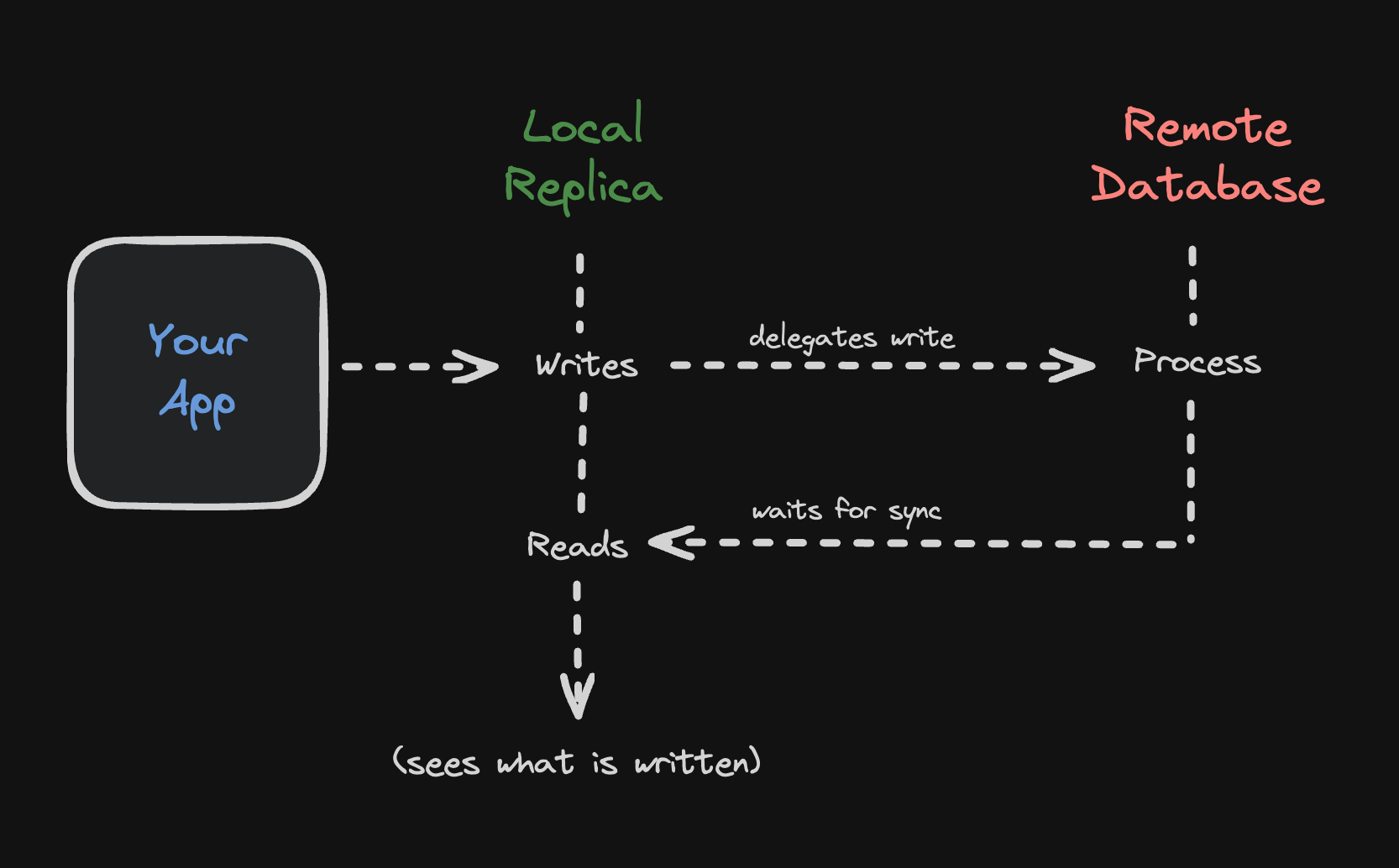
Embedded Replicas keep a local read replica of a Turso Cloud database: reads run locally from the file in microseconds, and writes are sent to the cloud primary and then reflected back to the replica. Embedded Replicas are fully supported in production.
For new projects that need sync, we recommend [Turso Sync](/sync/usage). Sync is built on the Turso Database engine and uses logical change-data-capture, providing local-first writes, explicit `push()` / `pull()`, and [significantly less bandwidth and lower latency](https://turso.tech/blog/sync-benchmark) than the page-level replication Embedded Replicas use.
Turso Cloud's embedded replicas let you replicate a database right within your application. This is especially useful for VMs or VPS deployments, and for mobile applications where stable connectivity is a challenge, since they allow uninterrupted access to the local database.
Embedded replicas provide a smooth switch between local and remote database operations, allowing the same database to adapt to various scenarios. They also ensure fast data access by syncing local copies with the remote database, enabling microsecond-level read operations.
## How it works
1. You configure a local file to be your main database.
* The `url` parameter in the client configuration.
2. You configure a remote database to sync with.
* The `syncUrl` parameter in the client configuration.
3. You read from a database:
* Reads are always served from the local replica configured at `url`.
4. You write to a database:
* **Writes are sent to the remote primary database** configured at `syncUrl` by default. They are NOT written to the local file first.
* You can write locally if you set the `offline` config option to `true`.
* Any write transactions with reads are also sent to the remote primary database.
* Once the write is successful, the local database is updated with the changes automatically (read your own writes, can be disabled).
### Periodic sync
You can automatically sync data to your embedded replica using the periodic sync interval property. Simply pass the `syncInterval` parameter when instantiating the client:
```ts theme={null}
import { createClient } from "@libsql/client";
const client = createClient({
url: "file:path/to/db-file.db",
authToken: "...",
syncUrl: "...",
syncInterval: 60,
offline: true, // Optional: Enable offline mode (default: false)
});
```
### Read your writes
Embedded Replicas also will guarantee read-your-writes semantics. What that means in practice is that after a write returns successfully, the replica that initiated the write will always be able to see the new data right away, even if it never calls `sync()`.
Other replicas will see the new data when they call `sync()`, or at the next sync period, if [Periodic Sync](#periodic-sync) is used.
 ### Encryption at rest
Embedded Replicas support encryption at rest with one of the libSQL client SDKs. Simply pass the `encryptionKey` parameter when instantiating the client:
The encryption key used should be generated and managed by you.
## Usage
To use embedded replicas, you need to create a client with a `syncUrl` parameter. This parameter specifies the URL of the remote Turso Cloud database that the client will sync with:
```ts TypeScript theme={null}
import { createClient } from "@libsql/client";
const client = createClient({
url: "file:replica.db",
syncUrl: "libsql://...",
authToken: "...",
});
```
```go Go theme={null}
package main
import (
"database/sql"
"fmt"
"os"
"path/filepath"
"github.com/tursodatabase/go-libsql"
)
func main() {
dbName := "local.db"
primaryUrl := "libsql://[DATABASE].turso.io"
authToken := "..."
dir, err := os.MkdirTemp("", "libsql-*")
if err != nil {
fmt.Println("Error creating temporary directory:", err)
os.Exit(1)
}
defer os.RemoveAll(dir)
dbPath := filepath.Join(dir, dbName)
connector, err := libsql.NewEmbeddedReplicaConnector(dbPath, primaryUrl,
libsql.WithAuthToken(authToken),
)
if err != nil {
fmt.Println("Error creating connector:", err)
os.Exit(1)
}
defer connector.Close()
db := sql.OpenDB(connector)
defer db.Close()
}
```
```rust Rust theme={null}
use libsql::{Builder};
let build = Builder::new_remote_replica("file:replica.db", "libsql://...", "...")
.build()
.await?;
let client = build.connect()?;
```
```php PHP theme={null}
use Libsql\Database;
$db = new Database(
path: 'replica.db',
url: getenv('TURSO_URL'),
authToken: getenv('TURSO_AUTH_TOKEN'),
syncInterval: 300 // Sync every 5 minutes
);
$conn = $db->connect();
```
```php Laravel theme={null}
// config/database.php
return [
"default" => env("DB_CONNECTION", "libsql"),
"connections" => [
"libsql" => [
"driver" => "libsql",
"database" => database_path("database.db"),
"url" => env("TURSO_DATABASE_URL"),
"password" => env("TURSO_AUTH_TOKEN"),
"sync_interval" => env("TURSO_SYNC_INTERVAL", 300),
],
// ...
],
];
// .env
DB_CONNECTION=libsql
TURSO_DATABASE_URL=libsql://...
TURSO_AUTH_TOKEN=...
TURSO_SYNC_INTERVAL=300
```
You can sync changes from the remote database to the local replica manually:
```ts TypeScript theme={null}
await client.sync();
```
```go Go theme={null}
if err := connector.Sync(); err != nil {
fmt.Println("Error syncing database:", err)
}
```
```rust Rust theme={null}
client.sync().await?;
```
```php PHP theme={null}
$db->sync();
```
### Encryption at rest
Embedded Replicas support encryption at rest with one of the libSQL client SDKs. Simply pass the `encryptionKey` parameter when instantiating the client:
The encryption key used should be generated and managed by you.
## Usage
To use embedded replicas, you need to create a client with a `syncUrl` parameter. This parameter specifies the URL of the remote Turso Cloud database that the client will sync with:
```ts TypeScript theme={null}
import { createClient } from "@libsql/client";
const client = createClient({
url: "file:replica.db",
syncUrl: "libsql://...",
authToken: "...",
});
```
```go Go theme={null}
package main
import (
"database/sql"
"fmt"
"os"
"path/filepath"
"github.com/tursodatabase/go-libsql"
)
func main() {
dbName := "local.db"
primaryUrl := "libsql://[DATABASE].turso.io"
authToken := "..."
dir, err := os.MkdirTemp("", "libsql-*")
if err != nil {
fmt.Println("Error creating temporary directory:", err)
os.Exit(1)
}
defer os.RemoveAll(dir)
dbPath := filepath.Join(dir, dbName)
connector, err := libsql.NewEmbeddedReplicaConnector(dbPath, primaryUrl,
libsql.WithAuthToken(authToken),
)
if err != nil {
fmt.Println("Error creating connector:", err)
os.Exit(1)
}
defer connector.Close()
db := sql.OpenDB(connector)
defer db.Close()
}
```
```rust Rust theme={null}
use libsql::{Builder};
let build = Builder::new_remote_replica("file:replica.db", "libsql://...", "...")
.build()
.await?;
let client = build.connect()?;
```
```php PHP theme={null}
use Libsql\Database;
$db = new Database(
path: 'replica.db',
url: getenv('TURSO_URL'),
authToken: getenv('TURSO_AUTH_TOKEN'),
syncInterval: 300 // Sync every 5 minutes
);
$conn = $db->connect();
```
```php Laravel theme={null}
// config/database.php
return [
"default" => env("DB_CONNECTION", "libsql"),
"connections" => [
"libsql" => [
"driver" => "libsql",
"database" => database_path("database.db"),
"url" => env("TURSO_DATABASE_URL"),
"password" => env("TURSO_AUTH_TOKEN"),
"sync_interval" => env("TURSO_SYNC_INTERVAL", 300),
],
// ...
],
];
// .env
DB_CONNECTION=libsql
TURSO_DATABASE_URL=libsql://...
TURSO_AUTH_TOKEN=...
TURSO_SYNC_INTERVAL=300
```
You can sync changes from the remote database to the local replica manually:
```ts TypeScript theme={null}
await client.sync();
```
```go Go theme={null}
if err := connector.Sync(); err != nil {
fmt.Println("Error syncing database:", err)
}
```
```rust Rust theme={null}
client.sync().await?;
```
```php PHP theme={null}
$db->sync();
```
You should call `.sync()` in the background whenever your application wants to sync the remote and local embedded replica. For example, you can call it every 5 minutes or every time the application starts.
## Things to know
* Do not open the local database while the embedded replica is syncing. This can lead to data corruption.
* In certain contexts, such as serverless environments without a filesystem, you can't use embedded replicas.
* There are a couple scenarios where you may sync more frames than you might
expect.
* A write that causes the internal btree to split at any node would cause many
new frames to be written to the replication log.
* A server restart that left the on-disk wal in dirty state would regenerate
the replication log and sync additional frames.
* Removing/invalidating the local files on disk could cause the embedded
replica to re-sync from scratch.
* One frame equals 4kB of data (one on disk page frame), so if you write a 1
byte row, it will always show up as a 4kB write since that is the unit in
which libsql writes with.
## Deployment Guides
Deploy a JavaScript project with Embedded Replicas to Fly.io
Deploy a JavaScript/Rust project with Embedded Replicas to Koyeb
Deploy a JavaScript/Rust project with Embedded Replicas to Railway
Deploy a JavaScript project with Embedded Replicas to Render
Deploy a JavaScript/Rust project with Embedded Replicas to Akamai